Bio Link Pages for OnlyFans Creators in 2025
Bio Link Pages for Content Creators in 2025
The Free & Instagram-Safe Alternative to Linktree
As a content creator, you know the core problem:
Instagram allows only one single link in your bio. At the same time, you’re active on multiple platforms — OnlyFans, Fansly, TikTok, Telegram, wishlists, tip links, and more.
How do you combine everything without risking your Instagram account?
The answer: Bio link pages.
But be careful — most tools are not suitable for adult content creators.
What Is a Bio Link Page?
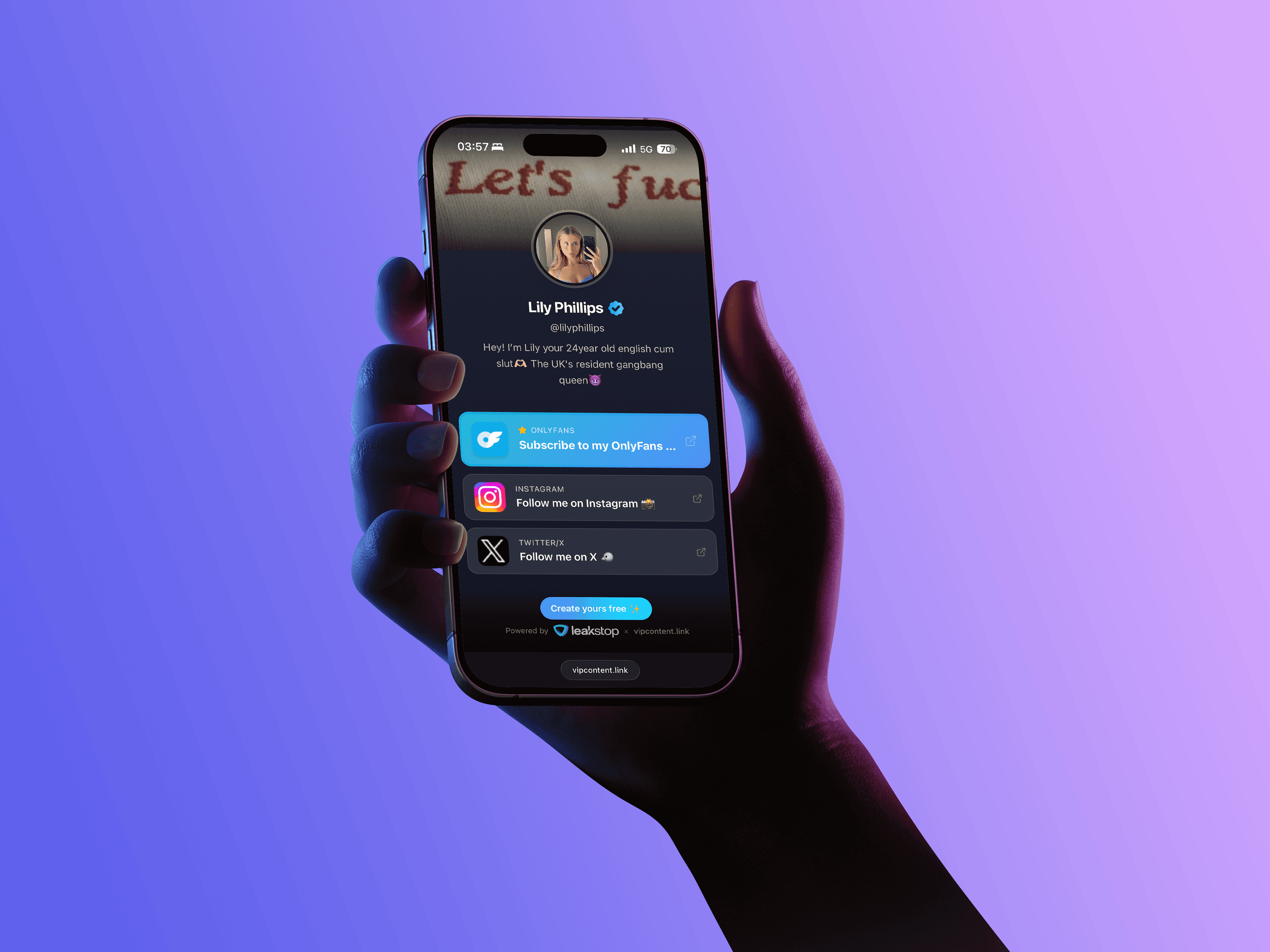
A bio link page is a central landing page that collects all your important links in one place.
Instead of linking multiple profiles, you use one single bio link, for example:
Your followers can find:
OnlyFans
Fansly
Instagram, TikTok, X (Twitter)
Telegram groups
PayPal, CashApp, Amazon Wishlist
Any other custom links
The Big Problem with Linktree & Similar Tools
Popular bio-link platforms come with serious risks for adult creators.
Problem #1: Instagram Shadowbans
Instagram automatically scans links in bios.
If your bio link page leads to adult platforms, you may face:
Shadowbans (your posts stop reaching people)
Link blocks
In extreme cases, full account suspension
Problem #2: Adult Content Restrictions
Most platforms explicitly prohibit adult content:
Linktree: “No sexually explicit content”
Beacons: similar restrictions
Stan Store: actively blocks OnlyFans links
What that means for you:
sudden account deletion
loss of all analytics
broken links everywhere
follower and revenue loss
Comparison: Linktree vs. vipcontent.link
Feature | vipcontent.link | Linktree Free | Linktree Pro |
|---|---|---|---|
Price | €0 | €0 | €24/month |
Links | Unlimited | 3 | Unlimited |
Analytics | Full | Basic | Full |
Themes | All free | 1 theme | All |
Instagram Protection | ✅ Yes | ❌ No | ❌ No |
Adult Content Allowed | ✅ Yes | ❌ No | ❌ No |
Featured Links | ✅ Yes | ❌ No | ✅ Yes |
Cover Images | ✅ Yes | ❌ No | ✅ Yes |
The Solution: vipcontent.link
vipcontent.link was built specifically for content creators — by the team behind LeakStop.
Why vipcontent.link Is Different
1. 100% Free — Forever
No freemium model. No hidden fees. No credit card.
Unlimited links
Unlimited clicks
Full analytics
All themes included
Featured links & cover images
2. Instagram-Safe Smart Protection
The most important feature: automatic Instagram Safe Mode.
How it works:
A user clicks your link inside Instagram
The Instagram in-app browser is detected
A safe version is shown (no adult keywords or links)
The user taps “Show all links”
The page opens in Safari/Chrome
All links — including OnlyFans — are visible
Result:
No shadowbans
No link blocks
Maximum account safety
3. All Features Creators Actually Need
Design
4 premium themes: Midnight, Blush, Ocean, Classic
Cover images (Twitter-style banners)
Built-in profile image cropper
Custom bio
Links
Featured links (bigger, higher CTR)
Unlimited regular links
Real platform logos
Drag-and-drop ordering
Analytics
Click tracking per link
Traffic sources
Time-based stats
Device breakdown (iOS, Android, Desktop)
4. No Content Restrictions
Supported platforms include:
OnlyFans
Fansly
4Based
Maloum
Patreon
ManyVids
Any custom link
How to Set Up vipcontent.link (30 Seconds)
Step 1: Create an Account
Open the website
Click “Start Free”
Choose a username
Enter email & password
Done
Step 2: Customize Your Profile
Upload profile picture
Add optional cover image
Write your bio
Select a theme
Step 3: Add Your Links
Featured Links (most important):
OnlyFans (“50% OFF this week!”)
Fansly
Regular Links:
Instagram
TikTok
X (Twitter)
Telegram
Amazon Wishlist
PayPal / CashApp
Pro tip: Featured links receive up to 2.5× more clicks.
Step 4: Add the Link to Your Instagram Bio
Example:
Instagram Safety Best Practices
Recommended
Neutral bio wording
Emojis instead of keywords (e.g. 🌶️ instead of “OnlyFans”)
Clean profile picture
Avoid
“OnlyFans”
“Subscribe”
“NSFW”
“18+”
Explicit emojis
Analytics & Performance Tracking
Your dashboard shows:
Total clicks
Profile views
Top-performing links
Conversion rate
Example traffic sources:
Instagram: 45%
X (Twitter): 25%
Direct: 20%
TikTok: 10%
Frequently Asked Questions
Is vipcontent.link really free?
Yes. Completely free. No limits.
Why is it free?
We monetize optional creator protection services. Bio links are our way of giving back to the creator community.
Can I still get banned on Instagram?
Extremely unlikely. So far, 0 reported bans during long-term testing.
Can I create multiple profiles?
Yes — simply use different email addresses.
Success Story
Sarah, OnlyFans Creator
“I used Linktree and got shadowbanned multiple times. Since switching to vipcontent.link: zero issues — and I no longer pay $24/month.”
Results:
+40% more clicks
No Instagram problems
€288 saved per year
Optional: LeakStop Integration
vipcontent.link optionally connects with LeakStop:
Automatic leak detection
DMCA takedowns
Millions of removed leaks
Optional only.
Your bio links remain free forever.
Final Verdict
vipcontent.link is the most creator-friendly bio link solution for adult creators:
Free forever
Instagram-safe
Unlimited everything
Professional design
Adult-content friendly
Get Started Now
Visit vipcontent.link
Click “Start Free”
Choose your username
Done
No credit card. No subscription. No tricks.
About vipcontent.link
vipcontent.link is built by the LeakStop team — experts in creator security and content protection.
SEO Keywords:
bio link, linktree alternative, instagram bio link, onlyfans link, free bio links, link in bio, instagram shadowban, creator tools